Showing posts with label apple ipad. Show all posts

iPad : The Wonders of Having One.

The latest innovation brought out by the Apple Company is the iPad. This tablet computer presents itself as a wonderful tool for audio as well as visual media. Books, movies, music as well as periodicals can be viewed through the use of the iPad.The iPad has similar operating system with the iPod Touch and iPhone. However, some features of the iPad are even greater than that of iPod Touch and iPhone. The iPad has the ability to run smoothly its very own applications. This tablet computer uses a multitouch display which is sensitive up to eleven fingers. This makes iPad a true wonder since there are some tablet computers which makes use of the stylus.
http://www.blogcdn.com/www.engadget.com/media/2006/02/ipad.jpg

Not to mention that this tablet computer is also Wi-Fi ready so you are able to browse the Internet, stream videos and even install software. It also uses 3G mobile data connection which can also allow you to do the things stated earlier.

The iPad is very much helpful in terms of business-oriented situations. It can actually help you jot down things while in a meeting without difficulty. It also allows you to present better presentations through the use of the iPad. One can be as very creative when using the iPad as a tool for the presentation.

Millions of iPads have already been sold and is still out in the market. More and more people are starting to use the iPad and gaining the benefits of it.

Create and Edit in iPad with the Pages Apple.

Have you ever thought of working with a word processor in your iPad? Yes you can! Thanks to iWorks for introducing Pages.
http://1.bp.blogspot.com/_gukd7vo5jGc/TFtiRPqfeeI/AAAAAAAAAF0/itW39RBH6LY/s320/Pages+App.jpg

Pages gives you a good opportunity to work on word processor just like working on Acrobat Reader and MS Word. With Pages, you can create new documents or import documents into your iPad. It also has features similar to other word processing softwares. You can choose templates, different fonts, colors and textures from its toolbar.

Uploading pictures and videos is also possible! This can be done through the media browser. Pages truly gives you features more than what a desktop can give.

Now, how does it work?

As you decide which documents to edit, there’s iTunes to keep you going. You may save your document in formats like you do in other word processing softwares. After getting your documents to your iPad and opening the Pages app, you’ll find the “My Documents” in a different way -- you wouldn’t find any folders, just a list of your documents. From all your documents imported in your iPad, choose which one to edit and start working. After editing, you’ll get a widescreen view to review your work.
And because you’re working on iPad, you can do all this in just a touch away!

What’s more, through Pages, you are able to send or move files to your PC via e-mail, iWork sharing or iTunes File Sharing.

News Corp’s Rupert Murdoch Launches “The Daily” Exclusive iPad Apple.


News Corp has just announced the launch of its exclusive newspaper for Apple’s iPad tablet, The Daily, an event on Wednesday. Joined by Apple’s vice president for Internet services Eddy Cue, Apple’s vice president for Internet services, joined News Corp chairman Rupert Murdoch and executives Jesse Angelo and Jon Miller headed the announcement “digital renaissance” at a press conference at the Solomon Guggenheim Museum in New York.

The Daily , becomes available in iTunes App Store at least an hour after the announcement, will offer - “depending on the news” - up to 100 pages of content each day. The new iPad app was skillfully designed and packed with numerous features to make the most of the iPad’s functionality, including HD video and 360 degree photos.

Murdoch and News Corp is also planning to bring “The Daily” publication available on other major tablets sometime in the future, but said that the next couple of years really belong to the Cupertino-based iPhone maker. It is expected that “The Daily “will be the new favorite and best selling apps. However, according to Murdoch, he will only declare success of the iPad-only app “when we’re selling millions.”

“Ambitions very big but costs are very low. If talk about success financially it's a low figure but we can be more ambitious than that,” he said.

Cisco adds iPad support to security system


Cisco Systems Inc. has improved its network-based physical security platform, so iPad uses will be able to send and videos to Cisco's physical access control platform.

Push Notifications not working on iPad

I had enabled all push notifications on my iPad 16gb 3G + WiFi. Afrer updated iPad to iOS 4.3, Push Notifications were not working. Only Email app will sound.

To solve the issue, reset all setting on the iPad. If it is still not working, delete and reinstall the apps you use push notifications for.

MultiPong for iPad.

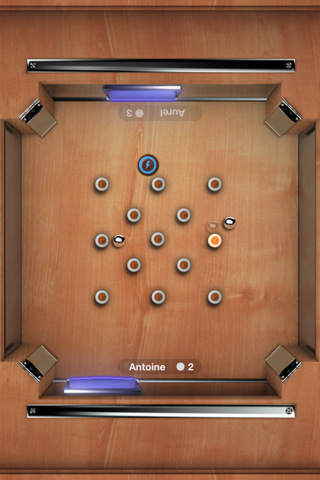
MultiPong for iPad is a new single-device multiplayer game, just another pong clone, with the HD graphic designs make you feel like playing on an real wooden board.

The app is very simple. You just control a bumper as a pinball bounces around to bump the pinball past other player's bumpers. You can play it with your family
or friends through Gamecenter/WiFi.

Download MultiPong for iPad ($0.99) from iTunes.

Photos in PDF file not visible on iPad 2


A 6MB PDF file that contains photos works fine on my Mac. After I sync the file to my iPad 2 and open it in iBooks and GoodReader app, the text appears and layout remains unchanged but all photos are not visible.

To fix the issue, just opening the original PDF file in Preview on your Mac and resaving to new file. Then taking it to the iPad and you are able to see all photos.

How to Enable Video Mirror in Original iPad.

I had updated my iPad 1 to iOS 4.3 last night and it all worked fine. How to Enable Video Mirror in Original iPad without jailbreak?

Video mirroring is only available on the iPad 2. It is not a feature of iOS 4.3 and does not support the original iPad.

iPad not correctly syncing calendars

My iPad calendar just shows all the entries 5 hours prior to when they are. My iMac and iPhone all see it correctly. Its Time zones all match and clocks are correct, but iPad is 5 hours early on any new calendar entries.

Make sure the time zone for calendars is correctly set. On your iPad, tap Settings > Mail, contacts, calendars > Calendars > Time Zone Support.

Ipad Not Charging.

ipad not charging

If Not Spoil Your Enthusiasm, Then Ipad AC Charger

Unless you’ve been living under a rock for the past week, you might have heard that Apple has released its ipad. But what’s an iPad without accessories and, you’ve guessed it, they’ve already started hitting the shops to make the most of the hype surrounding the iPad’s release. So far, there’s a nice keyboard dock, a camera connection kit, conventional docks, power adapters and iPad AC Charger, and roughly as many different styles of carry bags and cases as there were units sold on the first day.
Just like iPad Car Charger, which is a must to be carried along when you are driving your car, so that you can stay connected while you are on the move and away from your home or office, iPad AC Charger is must have ipad accessory.
The iPad requires more juice than the iPhone or any iPod. As a result, no iPhone or iPod chargers we tested—AC or auto—were able to charge the iPad as quickly as its own 10-Watt USB ipad AC charger. Higher-power USB chargers, such as Apple’s iPhone Power Adapter and some AC and auto chargers designed specifically for the iPhone, will charge the iPad, albeit more slowly, even while the iPad is in use. Other iPhone chargers, and most chargers designed for iPods, don’t provide enough juice to charge the iPad’s battery while the iPad is being used; you’ll see the message Not charging in the iPad’s menu bar. (These lower-power accessories will power the iPad during use; they just can’t charge the battery at the same time. When you put the iPad to sleep, the iPad’s battery will charge, but very slowly.)

Ipad With 3g.

ipad with 3g

What Do You Think Of The New Apple Ipad?

Apple has just unveiled its very latest product on the 27th of January 2010, called the iPad. It looks like a bigger version of the popular iPhone, Steve Jobs displayed the iPad at an event held in San Francisco. So what is the best thing about it? Well. It is powered by an Apple processor, called the A4, and the most shocking prospect is the price. Now the easiest way to describe the iPad, is hold your iPhone in your hands and stretch it until all the sides has a 9.7″ multi-touch display, change the plastic back with an aluminium cover, and then you will have a iPad! Technology wise, it is a lot more interesting. The iPad is powered by a 1Ghz Apple A4 chip, and has a battery life of around ten hours, and includes a whole month’s worth of standby time.
Click Here To Grab yourself one free Ipad Voucher Courtsey of Ticket Machine (Multiple claims not allowed)
It only has a few ports (dock connectors), but WiFi and BlueTooth make up for that, some of the iPads models are available in 3g as well. The iPads come with either 16GB, 32GB, or 64GB of storage space. Applications from the iphone will work well on here, there is no need to change or modify, as The iPad can either run iPhone applications in a small iPhone-sized window in the middle of the screen, or press the 2x button, that will change it from small to fit the whole screen.
One application which fills the full screen on the iPad and looks incredible, is an application which allows you to have videos embedded within the iPad, so it is made to look like a real newspaper! -photos can also enlarged when pressed. For text inputting on the iPad, this is very similiar to the iPhone which has a small keyboard for you to use and on the iPad, the same process has been applied but in a bigger version, which in effect is not very comfortable and easy to use, because you have to hold the iPad in one hand whilst typing with the other. Not very thoughtful of apple l must say.

How to protect your iPad? ??

You are over the moon since you purchased your iPad. But have you ever realised that improper maintenance of your gadget will eclipse your happiness? So to say, it¡¯s good that you have purchased iPad for all your entertainment or other needs, but at the same time you also need to maintain a good care of your gadget to facilitate its longevity and smooth functioning.

While purchasing iPad, don¡¯t forget to buy an iPad case. The iPad case ensures proper safety to your gadget. One of the most essential protections that the ipad case gives to your gadget is, it saves your iPad from being scratched and dented. It also sustains the little impact of outside force. The ipad case also keeps your iPad¡¯s look maintained so that even after one year of use, your gadget still looks afresh.

But the question is how to purchase a reliable ipad case. As the market is mushroomed with ipad cases, choosing the genuine one seems difficult at first sight. But it is not the most problematic issue as there is also genuine leather iPad case in the market. At most of the iPad stores, a consumer can purchase the genuine leather iPad case at reasonable price.

The genuine leather iPad case ensures all sorts of safety related concerns to your iPad gadget. Further, it is also one of the coolest safeties clad for your iPad as it enhances the look of the gadget as well as ensures proper safety. There are various options of genuine leather iPad case to choose from. They come in various designs and styles and depending upon your interest you can buy any one of them.

Understanding How to Use the Ipad.

Folks are doubtful about filling out a free iPads offer as these folk truly don¡¯t believe that they will really be given their stated Apple iPad. Many of these offers guarantee a free iPad in trade for assessing the device or partaking of some other offers. Lots of these offers call for filling out your bank card details to be part of a trial which may make lots of folks quite tired about attempting to get their free iPads.

IPad is fundamentally a device that fills the space between iPad touch and computers. Though there are a large amount of speculations over it, I am going to put down the arguments for you to choose alone. If you ask me, I adore the device like anything. In my view, it is an edge over all net books and the drab kindle e-book readers too. The style, class, simplicity of use that Apple has supplied with it is unmatched. Since the discovery of the iPad it is still basically the most wanted techie unit on the market. From the other standpoint, you will find a lot of disagreements that express that the iPad is an unnecessary machine and isn¡¯t needed as a consequence of the quite up to date development of the web-book.

A few folks believe it¡¯ll always be simpler to skim the web with a keyboard and mouse than with touch technology. This has not stopped folk attempting to obtain hold of free Apple iPads. There¡¯s also been a lot of intensely good media on the iPad. Because Apple have such a very effective selling profile, they were set to release their device after some of their competing firms but continue to have the great majority of the current market.

Numerous free iPad offers on-line that the most challenging part of obtaining just one totally free is recognizing which offer to pick out. It is usually best to obtain some comments from a close friend or member of the family on whether they actually got one of the free iPads. If you don¡¯t know anyone who has carried out an offer then you can always question on a website or merely do a basic search in any of the main search engines for ¡®free apple iPads, do the iPad offers truly get the job done?

ipad Case is Ideal for Basic Security to Your ipad.

Called the iPad 2 as the latest version of the Tablet PC has brought a very large apple recently. ipad is a tablet PC line design, development, manufacturing and marketing by Apple, such as the use and operation of audio-visual media, books, journals, music, movies, games and Web content functions. IPad between the size and weight of a modern notebook computers, and smart phones. It runs an application system to provide like a normal person's computer to provide comprehensive services. It also provides communications services by telephone. With these features, this is a very important project is very important to our lives there is a major and welcome to us. This is why Apple has returned to the drawing board to deal with ipad company case.


ipad case to protect your iPad from abrasions and scratches protection. They tied a small fold and for this incredible product stand out. You can not ignore such a situation. The case is ideal when you want to give your iPad some basic protection, especially when you finally let your your backpack iPad. You just fold it and put it into place. Wood iPad voluntary emission reductions from the hardwood and the case handicrafted 4 mm thick on both sides is to give it a solid feel of bamboo. It provides a soft liner, but enhance the strength of steel. The design also includes a wooden props, very suitable for desktop use. These cases are a strong conservation projects, and provide easy-to-iPad two convenience.

Some iPad case is the stylish attitude, and simply focus on the function of other cases. Messenger style case offers a good deal to protect the padding from your iPad bumps and bangs. It also features a notepad, business cards or anything you need to bring with you when you are busy busy day extra pocket. It looks great, but you can also choose the black purple and gray, black detail, if you like.

Ipad A Disappointment.

ablet | No Comments
ipad a disappointment

Apple Ipad Unveiled – Take A Look At Apple’s New Gadget

If you follow Apple, or tech news in general, you will know that Steve Jobs unveiled the iPad this week in San Francisco.
His goal/dream for the iPad is that it will bridge the gap between smartphones and laptops. But does the iPad fill this gap? Not really. But we’ll get to that in just a moment. The iPad at first glance looks like a scaled up version of the iPhone. And in some ways it is. First let’s take a look at the dimensions.
The iPad is half an inch thick, which is why many people began referring to it as iSlate. The IPS display is a rather respectable 9.7 inches. In comparison, the iPhone has a 3.5 inch display. The whole devices weighs 1.5 pounds.
According to Steve Jobs, the iPad has a battery life of 10 hours, and can stay in stand-by for one month.
Hardware specs are also pretty decent. The processor is a 1 GHz Apple A4, which should provide more speed than it does. As it stands, the iPad is not capable of multitasking. What does that mean? Well, if you’re reading this, you probably have your browser open. If you checked your inbox, your email client may be open. Then there is whatever other programs you normally use on your computer. With the iPad you can only use one application at a time. Disappointing, isn’t it?
I really don’t see this as a limitation of the hardware. Either the OS can’t handle the demands, or won’t. In either case this is something that Apple will have to fix in a future release.
As with most of the other hardware, Apple makes the iPad come in multiple different flavors, these range from the 16GB to the 64GB versions, with the price increasing for each one. The 16GB version costs $499, with the 32GB version jumping to $599. If you want the big version with 64GB storage space, you will be looking to spend $699.
The iPad connects over WiFi 802.11n, although some versions come with 3G. The data plans for the device start at $14.99 a month for 250MB of transfer, while the unlimited plan costs the double, $29.99, and you get free access to AT&T hot spots. Unlike the iPhone, there aren’t any contacts you get locked into. Instead it runs on the pre-paid model, which is activated directly through the device.
Some of the other features the iPad comes with are an accelerometer, compass, microphone, speaker, and a 30-pin connect. If you think you’re going to get a camera too, think again. The iPad does not come with a camera. This is rather disappointing, since including one with the device would make sense.
That about sums up the feature list. Does it sound like something you will need to have?
For me there are several issues with the iPad in its current state.
First, it doesn’t offer multitasking, which is a fundamental part of using a computer. If this isn’t changed, it isn’t anything more than a glorified iPhone with a lame name. This is the biggest problem for me with the device. Maybe this won’t bother most of the users, but for anyone that wants to do more than browse the Internet, read some email, and listen to music (not at the same time) this isn’t a viable solution.
Second, the lack of a camera. Apple’s solution for this was two huge adapters that could/should have been built into the device in the first place. Neither of them actually gives the device “real” camera functionality, instead they are only a way to import photos. Here is what Apple has to say about them:

Covers For Ipad.

covers for ipad
Will the apple ipad work with the new Apple iPad 2 smart cover?

There isnt much of a difference between the ipad 2 and the 1st one so i figured id stick with the 1st one and im getting it in a few days (wifi + 3g) but i really like the smart cover they made for the iPad 2 and i want one but ill have the first ipad…
my question is will that new iPad smart cover work for the first ipad


No, the smart cover won’t work with the iPad since the iPad does not have a proximity sensor like the iPad 2 does. That’s completely beside the fact that the iPad 2 is 33% thinner that the iPad, so the case won’t even fit on the original iPad.

Google Mobile App for iPad now available in the App Store.

We’re pleased to announce that a new iPad-friendly version of Google Mobile App is now available in the App Store worldwide. By “iPad-friendly”, we mean that this new version has been designed to show neatly on the iPad’s screen, and that the usual features of Google Mobile App for iPhone, like search by voice and My Location, work well. From the Apps tab, you can also easily navigate to Google’s web-based apps, such as Gmail, which was recently optimized for iPad.

While this first version of Google Mobile App for iPad is essentially the same app we’ve built for iPhone, we’re working on improving Google Mobile App so that it takes advantage of iPad’s features. Stay tuned as we continue to make it and other Google products even better on this new type of device.

Facetime not ring on iPad 2

The Facetime does not ring on my iPad 2 when it is called. The screen only shows that someone is calling. Try resetting the iPad did not solve the problem.

Then I eventually got it to work. I changed the switch from screen orientation lock back to mute in settings first, and turned the mute switch on and off again.

Death Rally - Racing game for iPad.

Death Rally is an overhead perspective car game for iPad. In the game, you will only drive the worst car for winning races, and then have money to upgrade your car, engine. The iOS version is brand new, already adding a new car, 2 weapons, and race type.

The visuals are gorgeous and the gameplay is very engaging. The addition of multiplayer would make it nearly perfect and more maps/cars would be welcomed.

Download Death Rally ($2.99) from iTunes.

Inkpad - vector illustration app.

Inkpad is a high-quality professional vector illustration app for iPad. The app comes with the ability to easily make paths, add and delete anchor points, create unlimited vector layer and custom gradients.

Inkpad combines a fantastic toolset with a well-designed user interface. Each component has a very healthy range of options and styles. In addition, you are able to email your drawings and also send them directly to your Dropbox. A perfect tool for graphic designers.

Download Inkpad for iPad ($4.99) from iTunes.