In April 2009, we announced a new version of Gmail for mobile for iOS and Android. Among the improvements was a complete redesign of the web application's underlying code, which allows us to more rapidly develop and release new features that users have been asking for, as explained in our first post. Today’s topic for the The Iterative Web App, a series where we continue to release features for Gmail for mobile, is the Stacked Cards Interface on the iPad.
When we announced our new interface for Gmail on the iPad, we requested feedback on how we could improve this experience for tablet devices. In June, we responded with a new compose screen. Today, we’re addressing the top feedback by launching a new “stacked card” interface for selecting and managing multiple conversations.
In the past, performing actions on selected conversations was awkward. There were two similar toolbars on the screen: one on the bottom left and the other on the top right. The former affected the selected conversations, while the latter affected the currently open conversation. Since the toolbars’ buttons looked similar, it was easy to mistakenly use the wrong toolbar. Sound confusing? It was.
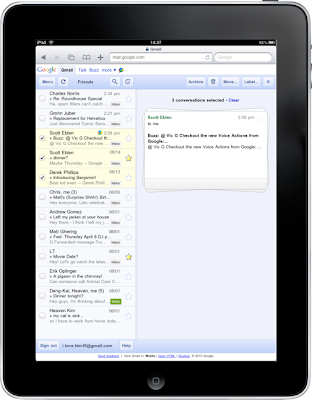
In the new interface, selected conversations are displayed stacked on the right panel for easy organizing, archiving or deleting. The second toolbar is gone so it’s always clear which conversations you’re working with.
When we announced our new interface for Gmail on the iPad, we requested feedback on how we could improve this experience for tablet devices. In June, we responded with a new compose screen. Today, we’re addressing the top feedback by launching a new “stacked card” interface for selecting and managing multiple conversations.

In the past, performing actions on selected conversations was awkward. There were two similar toolbars on the screen: one on the bottom left and the other on the top right. The former affected the selected conversations, while the latter affected the currently open conversation. Since the toolbars’ buttons looked similar, it was easy to mistakenly use the wrong toolbar. Sound confusing? It was.
In the new interface, selected conversations are displayed stacked on the right panel for easy organizing, archiving or deleting. The second toolbar is gone so it’s always clear which conversations you’re working with.

